
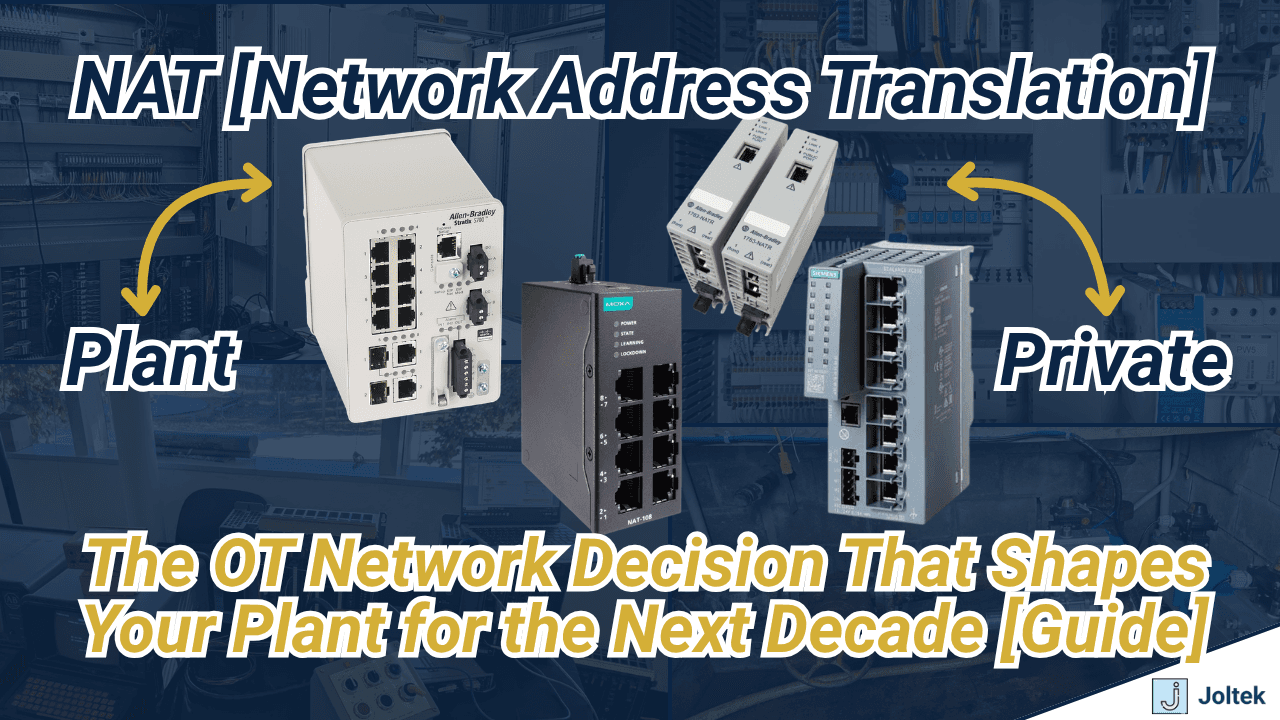
Industrial NAT or readdressing? If you have the people, the software licences and the machine builder's agreement, readdress the new machine into your plant scheme. If you don't, a 1:1 NAT device is the honest answer. Just know that NAT is a standard you are setting for every machine after this one, not a part you are buying.
I covered this on episode 18 of Factory Field Notes after working with a new client whose plant had a Rockwell 1783-NATR in almost every machine. That plant is not unusual. It is what happens when the decision gets made one machine at a time, by whoever is standing in front of the panel that week. This post is the written version of the episode, with two things the conversation only touched: which traffic will not cross a NAT boundary, and how to make the call before the next machine lands on your floor.
Why does a new machine arrive with the wrong IP addresses?
Picture a plant with a few production lines. Every line has electrical panels, and every panel has a control system on an Ethernet network: EtherNet/IP on the Rockwell side, PROFINET on the Siemens side, sometimes EtherCAT with CODESYS, Beckhoff or B&R. The plant has some kind of addressing scheme. Maybe the first panel's PLC is 10.10.10.1, the next is 10.10.10.2, and each area sits in its own VLAN.
Then the plant buys a new machine to expand production or replace something old. The machine builder designed and tested it in their own shop, with no idea what your plant network looks like. It arrives with their addresses, often something like 192.168.1.x, on the PLC, the HMI, every VFD and servo drive, and maybe a vision camera and safety devices too.
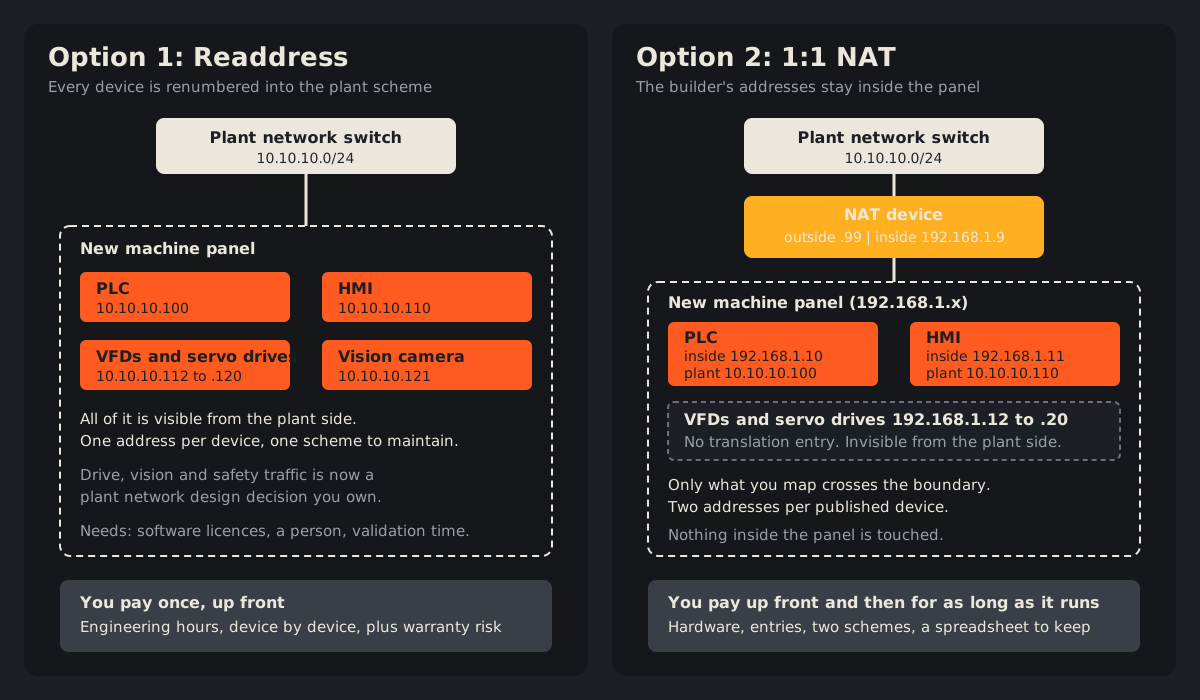
Now the plant has two options:
- Readdress every device in that panel to match the plant scheme.
- Put a NAT device in front of the panel and translate the addresses that need to be seen from the plant.
Both work. They cost very different amounts, and they cost them at very different times.
What does industrial NAT actually do?
Network address translation is the same idea that runs your home internet. Your provider gives you one public address, and the router translates between it and every private device in the house. That is one-to-many NAT, also called port address translation.
Industrial NAT for machine integration is usually one-to-one. The Rockwell and Cisco design guide on deploying NAT within a Converged Plantwide Ethernet architecture describes it as a service that assigns a unique outside address to an inside device, and says NAT "enables the reuse of IP addressing without introducing a duplicate IP address error." Using the numbers from the episode:
- The PLC is 192.168.1.10 inside the panel. The plant sees it as 10.10.10.100.
- The HMI is 192.168.1.11 inside the panel. The plant sees it as 10.10.10.110.
- The drives at 192.168.1.12 to .20 get no entry, so the plant does not see them at all.
Nothing inside the cabinet changes. The NAT device rewrites addresses on the packets as they cross, so the builder's scheme survives intact. The same guide notes that you can translate only specific addresses, which hides the inside scheme from the rest of the plant.
The hardware comes in a few forms. Rockwell sells the 1783-NATR as a dedicated NAT router, and its Ethernet Reference Manual (pages 42 to 43) lists one-to-one NAT on the Stratix 5400, 5410, 5800 and 5700 switches and on the 9300-ENA. Not every managed switch does it. The Stratix I keep on my desk can't, and Rockwell's OEM networking guide states plainly that its lightly managed switches do not support NAT. Other vendors build it into industrial switches too. Moxa recently sent me a ruggedized switch that, from my conversations with them, has NAT capability. I haven't powered it up yet.
What does readdressing really cost?
If it were up to me, I would readdress every single device to the plant side. One address per device, one scheme, no translation table to keep alive. It is not quite that simple, and the reasons are mostly about people and money rather than networking.
Who does the work, and with which licences?
Readdressing means connecting to the PLC, the HMI, and every VFD and servo drive, changing each address, and then validating that everything still talks. In a Rockwell plant that means a licensed copy of Studio 5000 (or RSLogix 5000 or RSLogix 500 on older equipment), very likely FactoryTalk View ME for the HMI, and the drive configuration tools. Then somebody has to fix every reference to the old addresses in the programs and test it.
A lot of small and medium plants don't have that person on staff. Once the machine builder leaves, bringing someone in to readdress and verify a whole panel gets expensive fast.
What happens to the machine builder's warranty?
This one rarely comes up in the engineering discussion and always comes up later. The warranty sits with the machine builder, and in my experience it is commonly void once you start making changes to the equipment. If your team renumbers the panel and the builder can no longer reach the devices at the addresses in their own records, you own that conversation. Read the warranty terms before anyone touches an address, and if you readdress, get the builder's agreement in writing.
Which traffic do you now own on the plant network?
This is the challenge that catches technically strong teams. Readdressing puts everything on the plant network, which means you are now deciding what traffic belongs there.
A PLC and an HMI are usually fine. They talk to each other and don't generate much load. Drives and servo drives are a grey area. A panel can have dozens or even hundreds of them, and you may not want all of that traffic published across the plant. Vision systems are heavier again, because they often push images to a server. Safety systems keep polling the devices they are connected to.
None of this means readdressing is wrong. It means readdressing is a network design job, not a renumbering job. Rockwell's own guidance (Ethernet Reference Manual, page 67) is to design small cell or area zones, each with a dedicated VLAN and IP subnet, and to avoid large Layer 2 networks. My post on OT network segmentation in brownfield plants walks through how to do that on a site that already runs.
What does industrial NAT really cost?
NAT looks cheaper because nothing inside the panel changes. The bill just arrives in instalments.
The hardware. A NAT device runs from about $1,000 to several thousand dollars, more if it is a proprietary or higher-end switch that brings other features with it. That is per machine, unless you design around one NAT switch serving several machines.
The engineering hours. Someone still has to build every translation entry, test it and document it. NAT doesn't remove engineering time. It moves it.
Two address schemes for the life of the machine. Every published device now has a plant address and an equipment address. You end up with islands across the facility that someone has to keep track of, and there is almost always a spreadsheet listing equipment IPs against plant IPs. That spreadsheet becomes load bearing. Decide now whether controls or IT owns it.
The contractor problem. Someone walks up to the panel, opens the PLC door, sees the address scrolling on the CompactLogix display, tries to ping it from a laptop on the plant network, and gets nothing. Because the address on the plant side is different. Every contractor and every new hire has to be told what they are walking into.
It spreads. From what I've seen, once a plant puts NAT on one machine, the chances of it going into every machine afterwards are substantial. That is how you end up with a 1783-NATR in almost every panel. So budget for the architecture, not the box.
Industrial NAT vs readdressing at a glance
| Readdress | 1:1 NAT | |
|---|---|---|
| Up-front cost | Engineering hours per device, plus validation | Hardware (about $1,000 to several thousand dollars per device) plus engineering hours per entry |
| Ongoing cost | One scheme to maintain | Two schemes per machine, a mapping spreadsheet, and onboarding every contractor |
| Skills and licences | Programming and HMI software for every device type in the panel | NAT configuration on one device |
| Machine builder warranty | At risk unless agreed in writing | Panel untouched |
| Plant-side visibility | Every device | Only mapped devices |
| Plant network traffic | All of it, so you must segment | Only mapped devices' traffic |
| Laptop access | One address per device, from anywhere routed | Depends on which side you plug in |
| Protocol limits | None added | No multicast translation, no FTP, no OPC over DCOM, and others (see below) |
| Best fit | Plants with the people and a segmentation plan | Replicated machines, or plants without the people to readdress |
Why can't my laptop reach the drive behind the NAT?
This is the part of the episode most people recognise.
Say you are an engineer at the office, plugged into the plant network, maybe through a Stratix or a Cisco switch, maybe over Wi-Fi. You open RSLinx and Studio 5000. You can reach the PLC at 10.10.10.100 and the HMI at 10.10.10.110, because both have translation entries. You can see the drive's status inside the PLC's I/O tree and tags, because the PLC talks to it on the inside. What you can't do is open Connected Components Workbench and go online with that drive. It has no entry, so from the plant side it doesn't exist.
Walk down to the panel and plug into the machine switch, and it reverses. Now your RSLinx needs a completely different setup, and you are looking at 192.168.1.10 for the PLC and 192.168.1.12 for the drive. That only works if your laptop has an address on 192.168.1.x. If IT provisioned that laptop and you can't change its network adapter settings, you can't work on the equipment side at all.
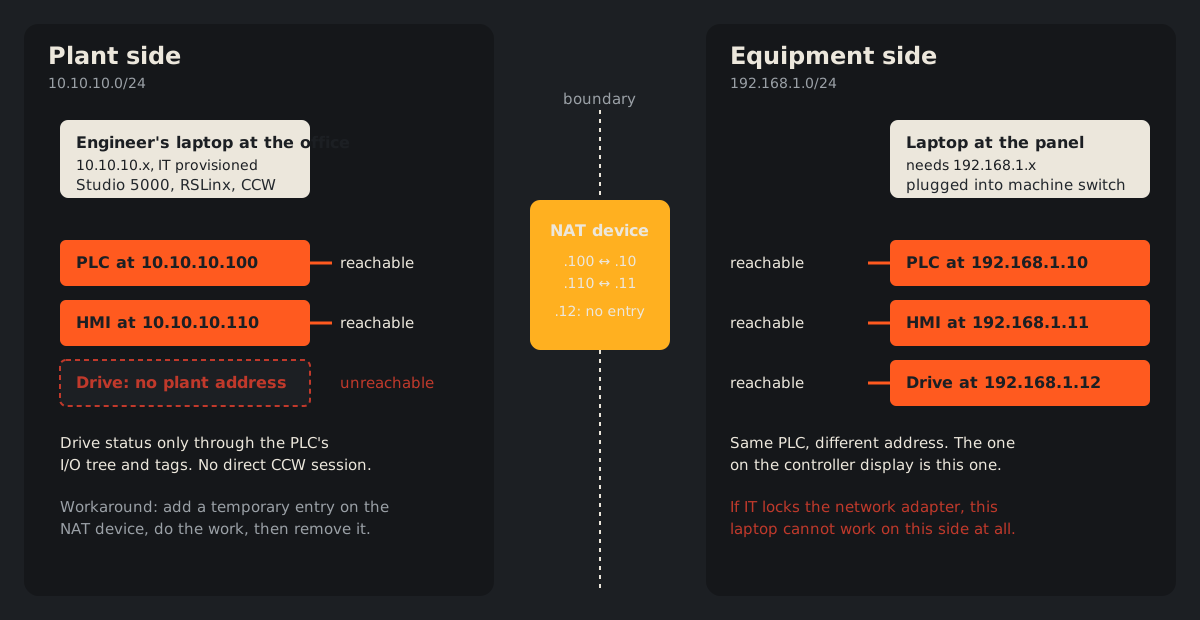
The workaround I described on the episode: the NAT device usually holds an address on both networks, for example 10.10.10.99 on the plant side and 192.168.1.9 on the equipment side. Go online with the NAT device from the plant, add a temporary entry for the drive, do the work (a parameter backup before a replacement, say), then remove the entry. While that entry exists, the drive's traffic shows up on the plant side, so keep the window short and know where that traffic goes.
If laptop access to machines is a regular fight in your plant, the earlier episode on wireless PLC access with a travel router covers the other side of the same problem.
What traffic will not cross an industrial NAT boundary?
This is the check I would run before buying anything. The Rockwell and Cisco NAT guide (page 2-10) lists traffic that is not supported across the NAT boundary, and notes that this is typical for all NAT devices:
- Multicast, including CIP Sync (IEEE 1588) and ControlLogix redundancy
- FTP
- Microsoft DCOM, which classic OPC uses
- CIP Safety to and from 1791-ES safety modules, because the IP address is part of the safety signature and is not fixed up (Studio 5000 version 21 and later)
- Encryption and integrity protocols such as IPsec transport mode, and applications with dynamic session initiation
The same page says a distributed FactoryTalk View SE application, with NAT between its servers and clients, is not recommended, although an HMI server on the outside can still read controller data from inside the boundary. The guide also notes that the Stratix 5700 implementation can only fix up ARP and ICMP traffic. Any other protocol that carries an IP address inside the packet goes through unchanged, and breaks. Multicast can't be translated, but it can be passed through or blocked.
So list every conversation that has to cross the boundary: line controller handshakes, SCADA polling, historian collection, safety, time sync, remote access. If anything on that list matches the list above, NAT is the wrong tool for that machine, or you have to redesign what crosses.
Is a dual-port PLC a third option?
Sometimes, at design time. A CompactLogix 5380 in Dual-IP mode can sit on two separate networks, port A1 on the plant side and port A2 on the machine network. The CompactLogix 5380 user manual (Chapter 9) is specific about what passes between them. The controller does not route TCP or bridge I/O connections between the two networks. It does bridge non-I/O CIP connections such as HMI traffic, messaging and sockets. The two networks must not use overlapping address ranges.
That makes it a segmentation boundary, not address translation and not a firewall. It helps when you are specifying the machine. It does little for a panel that has already arrived with the builder's addresses. My guide to OT network architecture for small and medium manufacturers puts dual-port PLCs, VLANs, Layer 3 routing and NAT side by side as segmentation tools.
How to decide between industrial NAT and readdressing
Here is the sequence I would walk through for each new machine.
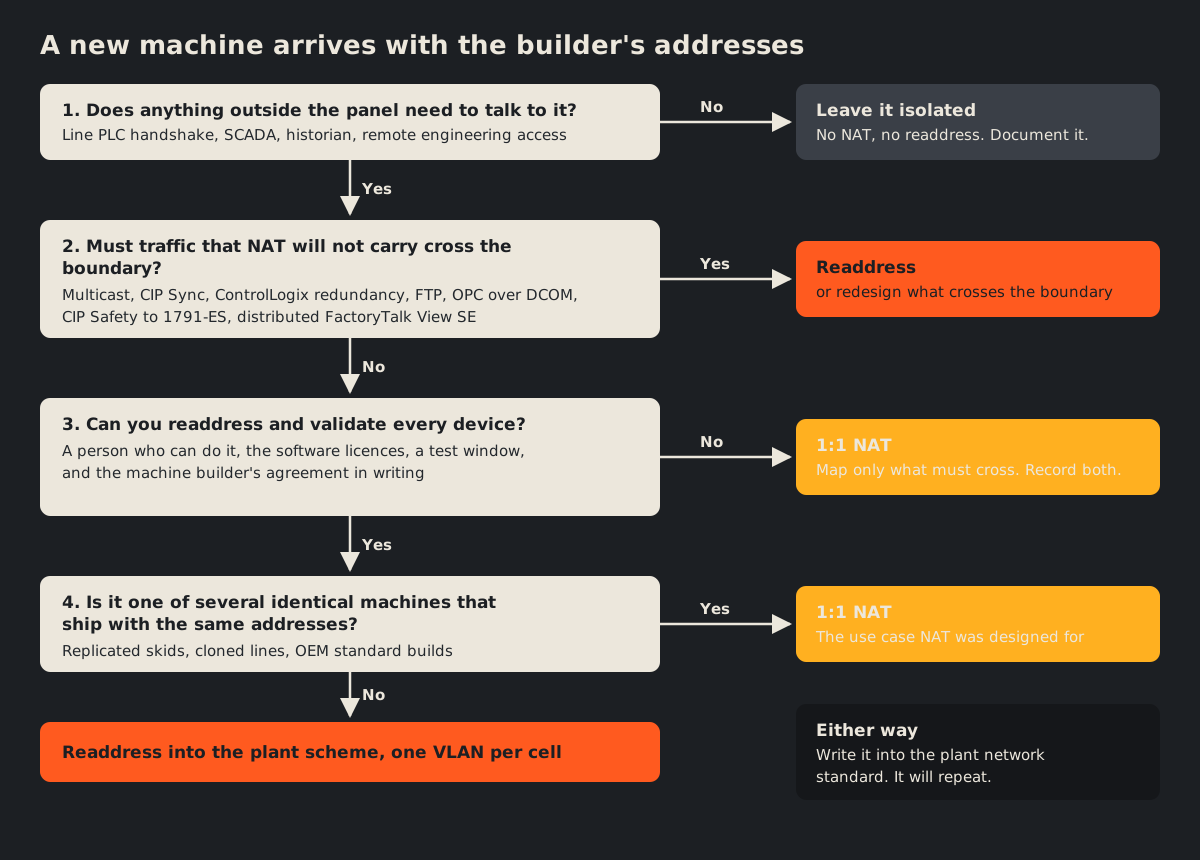
- Does anything outside the panel need to talk to it? If the machine truly runs alone, you need neither. Document it and move on.
- Must traffic that NAT can't carry cross the boundary? Multicast, redundancy, CIP Safety to 1791-ES modules, FTP, classic OPC. If so, readdress, or change the design so that traffic stays inside.
- Can you readdress and validate every device? That means a person who can do it, the licences, a test window and the builder's agreement. If any of those is missing, NAT is the realistic choice. Map only what must cross.
- Is this one of several identical machines that ship with the same addresses? Replicating skids and machines with identical addressing is the first business reason the Rockwell and Cisco guide gives for NAT. NAT fits it. If not, readdress into the plant scheme with a VLAN per cell.
Then write the answer down. Put the choice in the plant network standard so the next machine purchase starts from it. Keep the address mapping where controls and IT can both find it, and label the panel with both addresses. Brief every contractor before they open the door. NIST SP 800-82 Rev. 3 puts it simply: "A good practice for network architectures is to characterize, segment, and isolate IT and OT devices." Either option can get you there, but only if someone decides it on purpose.
If your plant already has a mix of NAT islands, readdressed panels and a spreadsheet nobody trusts, that is exactly what an OT network assessment is for: map what is there, decide the standard, and plan the next machines against it.