The HMI SCADA platform to learn in 2026 is the one the plants you serve already run. If you have no plant yet, start with Ignition, because the training is free and the trial never runs out. Then put most of your hours into the backend: historian structure, databases and the network. That part transfers to every platform.
That is the short version of the answer I gave on episode 19 of Factory Field Notes. It disappointed a few people in the comments, because the question was really asking for the platform with the best graphics. I think that is the wrong variable to optimize, and the rest of this post explains why and what I would do instead.
What was actually asked?
The question came from r/PLC. Paraphrasing closely: someone who works mostly with Weintek panels and Siemens asked which HMI and SCADA platform is worth learning in 2026. They felt their current tools were limiting for more demanding applications, and they wanted "a rich set of graphical libraries, modern UI components, advanced visualization capabilities." They also mentioned they write general purpose software and are comfortable with web technologies, and that PC-based solutions are fine.
The top comments all said the same thing. Ignition is good and it's free. Just start with Ignition.
I don't disagree with that. But I'd ask this person a different question first: why do you want to learn it?
Why "the most advanced HMI SCADA platform" is the wrong reason to learn one
The reason given was that they wanted something more advanced, more modern. I'd argue that is not a good enough reason on its own to spend months learning a platform.
Here is what happens in practice. You watch the courses, you build a few demo screens at home, and then you go back to work on the same Siemens panels as before, because that is what your customers run. If there's no way to practise those deployments in a real environment, it becomes a waste of effort. Not entirely wasted, because you'll have picked up ideas that apply to whatever you're doing. But without a place to deploy it, a new platform is mostly a hobby.
The better starting point is the installed base. What are your customers asking for? What do they already have on their lines, and what are they planning to standardize on for the next project? Plants rarely run every vendor. They pick one or two and live with them for a long time, and HMI and SCADA tend to follow the PLC vendor.
Which HMI SCADA platform to learn, by the plants you serve
The decision tree below is how I'd think about it. Start from the plants, not from the feature list.
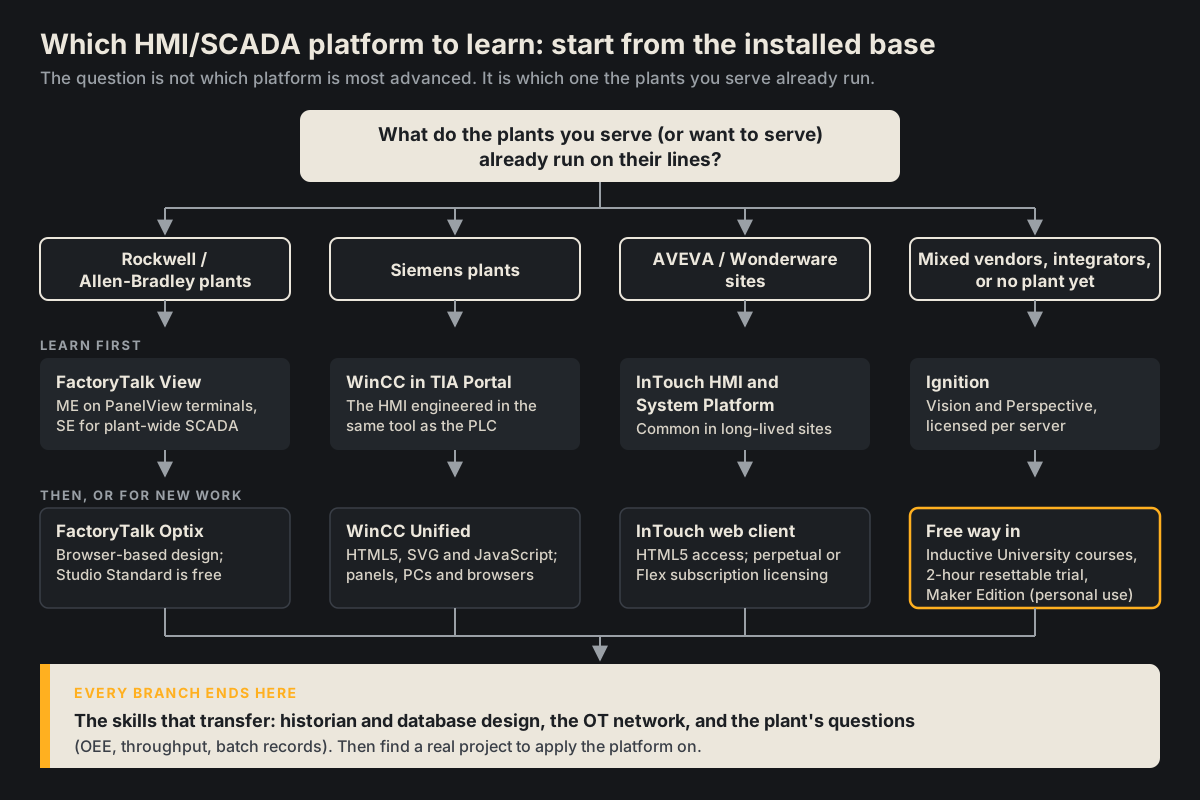
And here is the same thinking as a table, with what each platform looks like today and how you can practise on it.
| If the plants you serve run... | Learn first | What the newer generation looks like | A free or low-cost way to practise |
|---|---|---|---|
| Rockwell / Allen-Bradley | FactoryTalk View (ME on PanelView terminals, SE for plant-wide SCADA) | FactoryTalk Optix: browser-based design, panel, station and web clients on Windows and Linux | Optix Studio Standard is a free download; Studio Pro has a 90-day cloud trial |
| Siemens | WinCC, engineered in TIA Portal alongside the PLC | WinCC Unified: built on HTML5, SVG and JavaScript, runs on panels and PCs with browser access | Through Siemens or your distributor |
| AVEVA / Wonderware | InTouch HMI and System Platform | InTouch HTML5 web client; perpetual licensing or the Flex subscription | Through AVEVA or its distributors |
| Mixed vendors, an integrator, or no plant yet | Ignition (Vision and Perspective) | Perspective: HTML5 and CSS3, runs in any major browser and on mobile | Free Inductive University courses, a resettable two-hour trial, and Maker Edition for personal projects |
If you already know one of these well, the move to another is much smaller than it looks. On the episode I put it this way: if you are capable of developing systems on Weintek and Siemens, you should have no trouble transferring those skills to Ignition, to the Rockwell suite or to AVEVA. Tags, alarms, navigation, faceplates and historian setup follow the same logic everywhere. The editor changes. The discipline doesn't.
For the Rockwell side specifically, the product names get confusing quickly (ME versus SE, PanelView 5000 versus PanelView Plus, where Optix fits), and I've written up the split in more detail on the Joltek guide to FactoryTalk View and PanelView.
Why I still tell most people to start with Ignition
If you have no specific plant in front of you, or you work for an integrator that sees every vendor, my blunt answer is the same as the Reddit comments: do the free training from Inductive Automation and learn Ignition.
The reason is access, not features. Very few platforms let you learn the whole thing without a licence budget:
- The training is free. Inductive University runs its full set of Ignition courses at no cost, with a credential program on top.
- The trial does not expire. Per the Ignition licensing documentation, an unlicensed gateway runs for two hours at a time, and you can reset the timer as many times as you want. The Designer and the gateway web page are not affected, so you can keep developing while the runtime is stopped.
- There is a free personal edition. Maker Edition is free for hobbyists, students and individuals. It is strictly non-commercial, so it belongs in your home lab, not in a customer demo.
- It runs in a browser. The Perspective module builds screens in HTML5 and CSS3 that run in any major browser and on mobile. For someone who already does web work, like the person asking, that is a short hop.
Licensing, once you do buy it, is per server. I've covered the career side of this before: in the career advice episode I made the point that you can learn everything you need on the SCADA side for free from the Inductive Automation website, and that people coming from business IT software often find SCADA and MES the most natural way into this industry.
What I would not do is stop at Ignition. Since this person already knows Siemens, I'd definitely consider Rockwell as the alternative. It may well open doors. And AVEVA has been pushing its platform more aggressively than in past years, so it's worth keeping an eye on.
Screens are commoditized. The backend is the skill.
This is the part of my answer that got the least agreement, and the part I'm most sure about.
The person asked for modern UI components and rich graphical libraries. I think that piece has been commoditized. With AI tools, and with most packages now building screens on web technology, the people designing HMIs can pull in years of best practice from the web and software world. Even Rockwell has Optix at this point. If all you want is a nicer screen, you will find it in most modern packages.
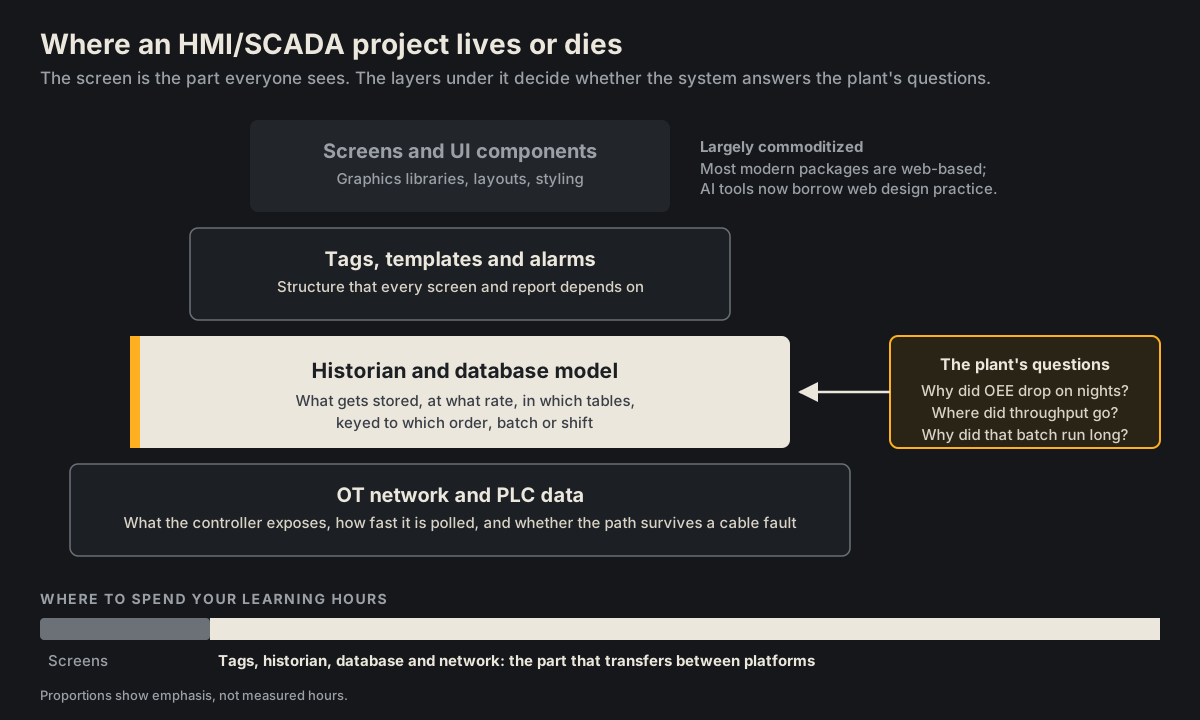
Where the challenge still lies is the backend. When you talk about HMI and SCADA systems, you are talking about historians and networks as much as screens, and ultimately you have to build a backend that solves a problem for that customer. Three pieces carry most of the weight.
How is the historian and database organized?
A SCADA system is only as useful as the data it keeps. You need to decide what gets stored, how often, in which tables, and keyed to what: the order, the batch, the shift, the machine state. On Ignition, for example, the Tag Historian stores history in your SQL database and creates and maintains the tables for you. That's convenient. It doesn't decide for you how the rest of your data model should look, and whether a plain relational schema is enough or the volume calls for something built for time series.
If you get this wrong, nobody notices for months. The screens look fine. Then the plant asks a question the data was never structured to answer. I go through the platform and historian choices in more depth on Joltek's SCADA and historians page.
What does the network and the PLC actually give you?
Every value on a screen came across a network from a controller. If you don't understand what the PLC exposes and how fast you are polling it, you will build trends that miss the events that matter. A controller scanning every few milliseconds can see a fault and clear it long before a one-second poll catches it. I wrote up why SCADA misses fast PLC events and how to latch them separately, because it surprises people who come from the IT side.
The network itself matters too. On the same episode we talked about device level ring on a Stratix switch: daisy-chain the devices and close the loop back to the switch, so one failed cable doesn't drop a node off the network. That's the kind of detail that decides whether your SCADA shows real data or a wall of stale values.
What questions will the plant ask?
This is where the projects actually live. A batching system. A system that tracks throughput. OEE type metrics. Each of those starts as a question from operations or management, and each one needs the data to be structured for it from the beginning. A developer who can sit with a plant manager, understand the question and design the database to answer it is worth far more than one who can build a beautiful faceplate.
Why the HMI SCADA platform to learn needs a real project behind it
If you just learn a platform in textbook format, it may not meet the need of a specific customer. The ideal scenario is that you already have HMI and SCADA experience and you land a project that lends itself to learning the new platform. You learn the tool against real constraints: a real network, a real historian, a real operator who will tell you the screen is wrong.
So my practical advice comes down to a sequence:
- Ask the market. Look at what your current customers and the plants you want to work for actually run, and what they're specifying on new projects.
- Learn the free platform anyway. Do the Inductive University courses and build something small on the resettable trial or Maker Edition. It's the cheapest way to see a modern, web-based SCADA end to end.
- Go deep on the backend. Build a historian, query it, structure a table around a batch or a shift, and break a network connection on purpose to see what your screens do.
- Find the project. Spend your effort figuring out whether there's an upcoming project where you can use the platform you're learning. That is where the learning sticks.
We looked at a good example of this in an earlier episode on going from generalist to specialist: a home lab portfolio project that combined Factory IO, structured text on CODESYS and Ignition for the SCADA layer. That's the right instinct, an end-to-end system rather than a screen gallery. The catch we discussed is the same one as here: if the plant you're interviewing with runs Studio 5000 or TIA Portal, re-implement a slice of it on their platform.
What else was in episode 19?
The HMI SCADA question was one of six Reddit threads on the episode, and the others are worth the listen:
- A flooded Siemens PLC that now plays Street Fighter. Someone pulled a PLC out of a scrap panel that "went swimming," cleaned it board by board in an ultrasonic cleaner, and wired it up as a game controller over Modbus. Conformal coating on PLC boards is part of why that's possible.
- Device level ring on a Stratix switch, and why I carry a long Ethernet cable to commissioning jobs so I can sit at a real table instead of a stool in front of the panel.
- An ice cream wash down panel, where a safety CompactLogix I'd ballpark at $20,000 or more sits at the bottom of the enclosure while VFDs worth roughly $600 to $1,000 each sit at the top. I typically see the control components at the top instead.
- Imposter syndrome as a new automation technician. I started as a control systems engineer at Procter & Gamble in April 2014 without ever having heard of a PLC. I still get nervous going on site with a new customer.
- Ladder, structured text or function block to close it out.
All of it is on the full episode page.
My answer, in one line
Learn the platform your plants run, use Ignition as the free way in, and spend most of your time on historians, databases and networks. The screens will keep getting easier to build. The backend is where the work is.