
A PLC training kit students learn from looks like a small piece of a real panel. Every I/O point lands on a labelled terminal block, not a banana jack. Everything students touch runs at 24 V DC. And the red mushroom button is a real emergency stop circuit, or it isn't on the kit.
That is my short answer. The long one comes from episode 20 of Factory Field Notes, where I went through two student builds posted to r/PLC: a trainer built for an engineering university and sponsored by Mitsubishi Electric, and a capstone panel running a two tank transfer system on an Arduino Opta. Both had the right ingredients. Both missed things a student will meet in the first week on a plant floor.
I have strong opinions here. I've built my own training kits, I've put full courses on SolisPLC, and I've watched how people actually learn this trade. So this post is the design guide I'd hand to an instructor before they order parts.
What should a PLC training kit actually teach?
The kit exists to make the first day in a real panel feel familiar. That is the whole job.
The university trainer on the episode had a lot going for it. A compact PLC with digital and analog I/O, a matching HMI, a VFD with a small three phase motor on the bench, a stack light with a buzzer, push buttons, a selector switch, miniature relays, a potentiometer for analog input, a voltmeter, a push pull solenoid in front of a proximity sensor, a photo eye and a limit switch. Six amp breakers on the supply side. An Ethernet switch. If you made a list of devices a student should see, that list is pretty close.
The problem was how all of it reached the student. Every point was broken out to banana jacks on the faceplate. So the student never strips a wire, never crimps a ferrule, never lands a conductor in a terminal and never has to read a terminal number off a drawing. Those are the things they will do on day one.
So before choosing any hardware, I'd ask three questions:
- What will a student wire with their hands?
- What will they program?
- What will they troubleshoot when it doesn't work?
The answers decide the kit. Not the catalogue.
Banana plugs or terminal blocks on a PLC training kit?
I used banana plugs at university for basic circuit simulation, and for that they're fine. You patch a circuit, measure it, move on. But a PLC training kit is supposed to prepare people for industrial panels, and in an industrial panel field wiring lands on DIN rail terminal blocks. Those are their own product family, covered by IEC 60947-7-1, with matching green-yellow protective earth terminals under IEC 60947-7-2.
On the episode I called the banana jacks a huge missed opportunity, and I still think so. Here is the trade, laid out honestly.
| Banana jacks | DIN rail terminal blocks | |
|---|---|---|
| Speed to patch an exercise | Very fast | Slower: strip, ferrule, land, tighten |
| What the student practises | Plugging leads | The skill they'll use in every panel |
| Matches plant hardware | No | Yes |
| Teaches terminal numbering and drawings | Rarely | Naturally, if the terminals are numbered |
| Repair after heavy use | The faceplate itself | Individual blocks swap out on the rail |
| Mistakes students can make | Few, so they learn little | Loose strands, wrong terminal, unlabelled wire: all worth catching in class |
That last row matters most. The mistakes a student can make on a terminal strip are the mistakes I want them to make in a lab, with an instructor next to them, and not on a running line.
The core kit plus terminals layout
My preference is a compact core kit with the major devices permanently mounted, and everything else brought in through terminals. The trainer on the episode went the other way. It had every push button, lamp and sensor fixed to the faceplate.
Here's why that bothers me. In my experience, once you've wired the same stack light once, maybe twice, maybe three times, it gets old very quickly. A permanent device gives you one exercise. A terminal gives you every exercise you can think of. So I'd keep the field devices on removable modules and let the instructor swap them per lesson.
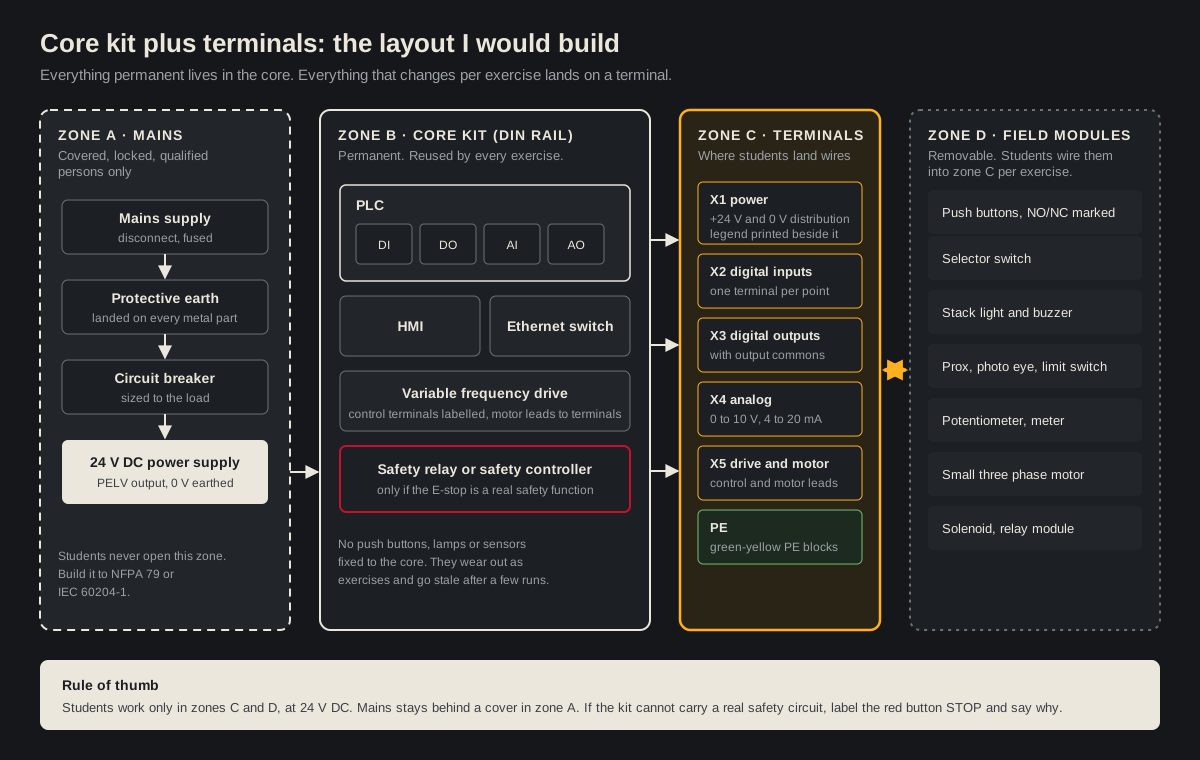
The four zones, in plain terms:
- Zone A, mains. Supply, protective earth, breaker, 24 V DC power supply. Covered, and built and maintained by a qualified person. Students don't open it.
- Zone B, the core kit. PLC, HMI, Ethernet switch, drive, and a safety relay if the kit has a real emergency stop. Permanent.
- Zone C, terminals. Power distribution, digital inputs, digital outputs, analog, drive and motor, and protective earth. Every one numbered, with a printed legend beside the strip.
- Zone D, field modules. Buttons, selector switch, stack light, sensors, potentiometer, motor, solenoid. Removable.
A compact core also teaches something by itself. When I reviewed the capstone panel I said you could probably cut it to half the size by moving the terminals and rearranging. For a demo it doesn't matter. In a plant, panel real estate comes at a premium, and a student who learns to lay out tight and leave expansion space at the bottom has learned something real.
Why an E-stop on a PLC training kit has to be real, or not be there
This was the part of the episode that concerned me most. The university trainer had an emergency stop on its faceplate with what looked like a single line going to it. From the photo, it was the form factor of an E-stop, but functionally it was an ordinary push button.
Safety first. Nothing in this section is a wiring diagram, and none of it replaces a risk assessment or a qualified designer. Emergency stop circuits are designed to ISO 13850 and IEC 60204-1 (or NFPA 79 in North America), with the required performance level set under ISO 13849-1. Follow the safety device manufacturer's instructions, and test the function before anyone relies on it.
Here's what the standards say an emergency stop is. ISO 13850 treats it as a complementary protective measure, not a replacement for guarding. The device latches when pressed and stays latched until someone deliberately resets it, and the reset must not restart the machine by itself. A separate start command does that. The stop itself is stop category 0 or 1 under IEC 60204-1. The actuator is red on a yellow background, a colour combination reserved for emergency stops, as Schneider Electric's summary of the pushbutton colours puts it.
On the episode I said E-stops are normally dual channel safety circuits. That's what you'll see on most industrial machines, but I want to be precise about it. The standard doesn't say "two wires." It says the function must reach the performance level your risk assessment requires, and ISO 13850 sets the floor at PLc. When the risk assessment calls for a higher level, that's where the dual channel, monitored architecture comes from: two direct opening contacts into a safety relay or safety controller that checks both channels, catches faults and watches its own output contactors.
What is never acceptable is the version on the trainer: an E-stop shaped button wired into a standard PLC input, where stopping depends on a bit in a rung. A standard PLC is not a safety rated device.
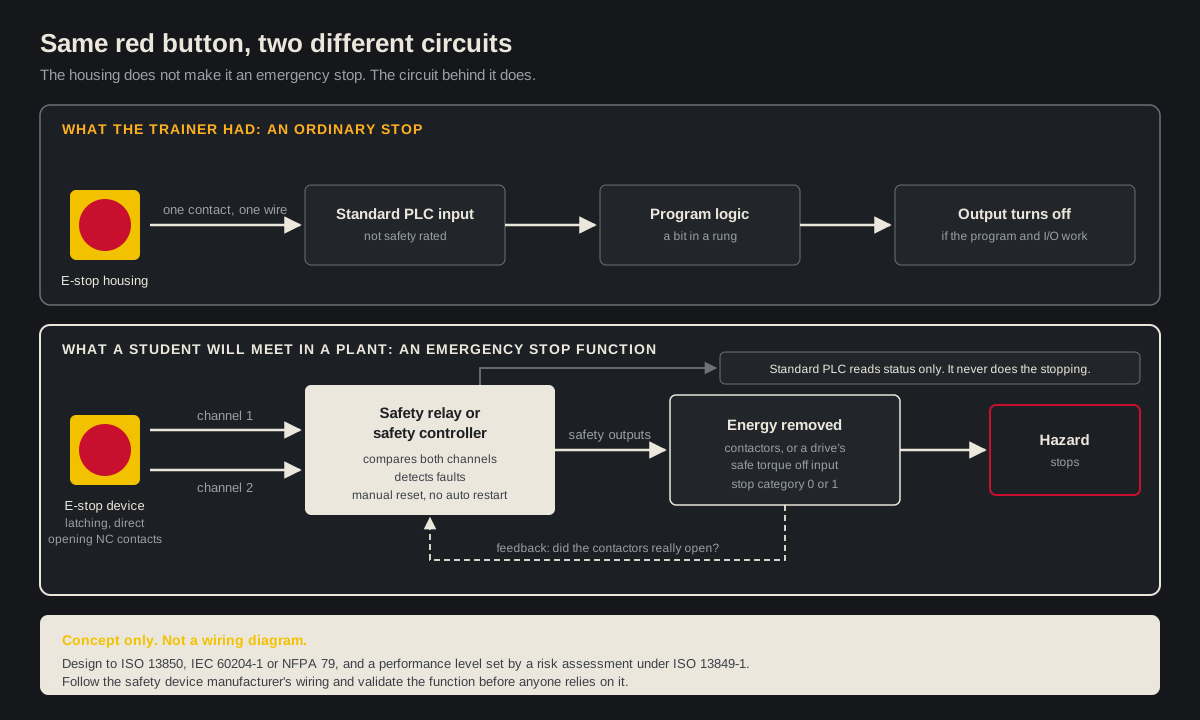
So, for a training kit, there are two honest options:
- Build a real one. A proper E-stop device, a safety relay, and a stop that actually removes energy from the outputs or the drive. It costs more, and it teaches the most important circuit on any machine.
- Leave it off. Use an ordinary stop button, label it STOP, and spend a lesson explaining why it isn't an emergency stop.
The one option I'd rule out is the middle one. A trainer that teaches the shape of an E-stop without the circuit behind it teaches the wrong lesson, and students carry that lesson into plants.
Colour codes, contact states and drawings students can trust
The university trainer had 24 V DC in yellow and 0 V in blue. I'm honestly not sure where that scheme comes from. What I do know is that both machine wiring standards give conductor colours specific jobs. IEC 60204-1 recommends blue for DC control circuits, and both IEC 60204-1 and NFPA 79 reserve green or green-yellow for protective earth only. The capstone panel had its own variation, with one side of a circuit in red and the other in white.
My rule for a kit: pick the scheme from the standard your students will work under, print it on the faceplate, and use it everywhere. Consistency is the lesson.
The same goes for the drawings. On the trainer, nothing said whether a push button was normally open or normally closed. I could guess from the colours, but a student shouldn't have to guess. The selector switch was drawn with manual and auto joined through the switch, which doesn't look like any selector I've seen in the field. And the trainer had plenty of empty faceplate space to draw it properly.
Three things I'd put on every faceplate:
- The contact state of every device: NO or NC, drawn as a symbol, not just a colour.
- Terminal numbers that match a printed drawing in the binder.
- The function of every drive terminal. The VFD on the trainer had its control terminals broken out with their factory codes and nothing else. Name them.
What a good capstone panel still gets wrong
The second build on the episode was a student's capstone: a two tank transfer system with an Arduino Opta, an ESP32 on a breadboard, a 24 V DC supply, terminal blocks, wire duct and a row of hobbyist relay modules. Honestly, I liked it. The wire trays were neat, every conductor had a crimped termination, and I would not have expected a build like this at my university when I was studying. The Opta didn't even exist then.
Three things I'd still fix, and they apply to any PLC training kit.
Land the ground. The power supply's earth terminal was empty. That's a safety requirement, not a style choice, and it's the first thing I'd fix before the panel goes anywhere near production.
Don't double up relays without a reason. The Opta datasheet lists four normally open relay outputs at 10 A each. In the photo, those outputs drove a hobbyist relay board that, from what I could read, was also rated for 10 A. That's two relays doing one job with no extra capacity. Maybe there's a reason in the design, but a student should be able to say what it is.
Find out where the E-stop actually goes. The panel had an E-stop on it, but with only a breaker feeding the power supply, it wasn't going to remove power from the panel the way it was wired. The student even said they planned to "move to an e-stop" after testing. Good instinct. Research the dual channel circuit, even if the safety relay is out of budget, so you understand what it takes to shut the system down properly.
I'd add one more: move the breadboard electronics into an enclosure. If you have access to a 3D printer, print a DIN rail mount. Bare embedded boards don't belong in an industrial panel.
How to build a PLC training kit, step by step
Here's the order I'd follow, with the steps the two kits on the episode tripped on marked in amber.
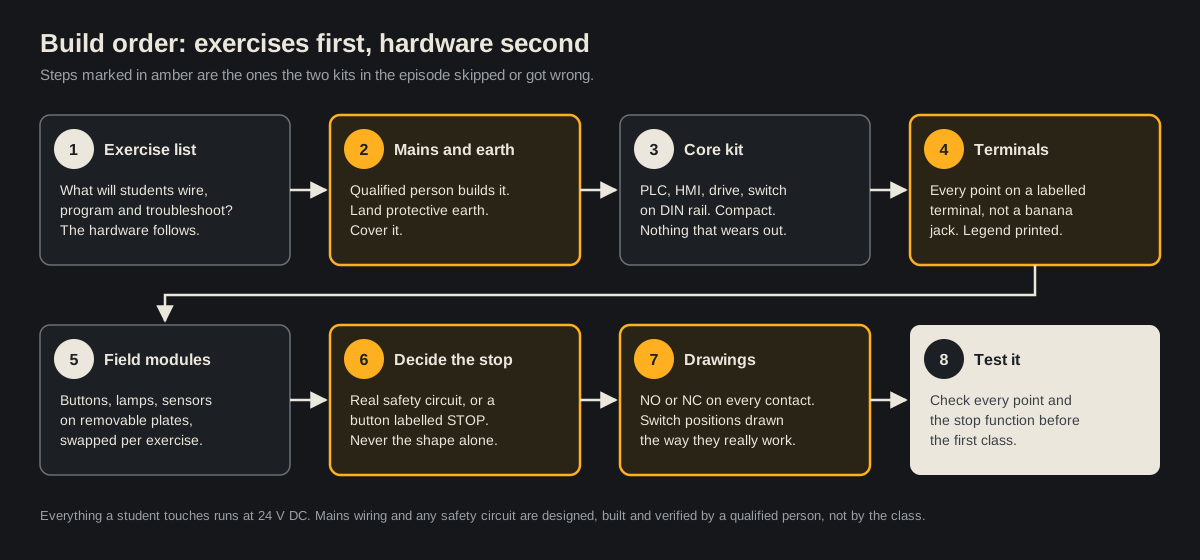
- Write the exercise list. Motor start and stop, a sequence with a sensor, an analog scaling exercise with the potentiometer, a drive speed reference. The hardware follows.
- Build the mains section and land protective earth. A qualified person does this, to NFPA 79 or IEC 60204-1, and covers it.
- Mount the core kit on DIN rail. Keep it compact and leave space.
- Bring every point to numbered terminals, with the legend printed beside them.
- Put field devices on removable modules.
- Decide the stop. A real safety circuit, or a button labelled STOP.
- Draw the faceplate and the binder drawings so they match the hardware.
- Test every point, and test the stop function, before the first class.
Don't forget the computer
The episode opened with a meme every Rockwell user knows: a laptop choking on a Logix Designer project. It's funny because it's true. My own field laptop is a 17 inch machine with a dedicated graphics card and 32 GB of RAM, and the fan is loud enough that people notice it in meetings.
Rockwell's own Logix Designer v38 system requirements list a minimum of 4 logical cores and 8 GB of RAM, and recommend 8 cores and 16 GB. I've heard of many employers handing out thin laptops with 4 GB. They save a little on the laptop and lose far more in engineering time. A training lab is no different. If the lab machines can't open the project, the kit sits idle.
If thin machines are what you have, the workaround is a virtualized engineering workstation on Windows Server or Proxmox that students remote into. I've seen that done well and done badly. If you want to try it, the Joltek blog has a walkthrough on installing a Windows VM on Proxmox.
Why the wiring matters for the career
The episode also took a question from a young engineer in South Korea: do PLC and DCS engineers need electrical and wiring knowledge? In most cases, yes. If you select a controller, you specify the I/O that drives and reads real loads. And it's usually preferred that the person who designed a system goes to the field to commission it. Pure design roles that hand drawings to someone else exist, but they're rarer.
When I worked at Procter & Gamble and Kraft Heinz, technicians carried most routine maintenance and minor troubleshooting. Engineers got the call when nobody else could figure it out. You don't need every calculation in your head. You do need to understand the voltages and currents in front of you. That's exactly what a training kit with real terminals builds, and it's the same skill set we work on in our on-site automation training for plant teams and lean on during commissioning support for automated lines.
If you're earlier in this, two older episodes pair well with this one: the Q&A on free simulators, browser IDEs and physical PLC trainers, and the panel build reviews and the learning path I'd follow today.
A simulator teaches logic. A good PLC training kit teaches the panel. Build it so the first real panel a student opens looks like something they've already wired.